Main area
Enter your data and press Calculate

Calculate trapezoid area from bases and height, or from sides and angle. Includes perimeter.
Compute area, perimeter and height using bases and height, an oblique side plus angle, or the isosceles assumption. Includes instant unit conversions and formulas.
Enter positive values only and pick the unit before calculating. Adjust the decimal count to match the precision you need for homework, lab reports or CAD work.
The “Bases + side + angle” mode derives the height trigonometrically, while the isosceles mode supplies both height and full perimeter.
Average the two parallel bases (B and b) and multiply by the perpendicular height h. The full expression A = (B + b) / 2 · h works for right, isosceles, or scalene trapezoids.
The “Bases + side + angle” mode uses the oblique side length l and the included angle θ to compute height with h = l · sin(θ). Heights are zero at 0° or 180°, so pick an angle that represents the real trapezoid to obtain a valid area.
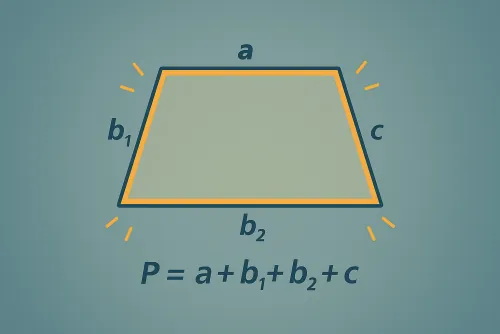
The perimeter appears automatically in the isosceles mode because both oblique sides are equal and the tool derives P = B + b + 2l. For non‑isosceles trapezoids you would need to measure the second oblique side.
Enter data in meters, centimeters, millimeters, inches, or feet. The chosen unit applies to every input and the main area output, while the automatic conversions display equivalents in mm², cm², m², in², and ft². Adjust the decimal setting if you need finer precision.